Prototype a character’s moves
Your editor utility can submit a description, check the task and retrieve the result without a separate round of browser downloads. Save the project ID so the next animation belongs to the same character.
 SpriteFuseDevelopers
Create characters, animate their next move, and bring the files into your game. Call SpriteFuse from the scripts and tools you already use.
Scoped keys · Your existing SpriteFuse Credits
curl https://spritefuse.com/api/v1/account \
-H 'Authorization: Bearer YOUR_API_KEY'A read-only first request. Returns your balance and limits without spending Credits.
Start with a character, then create an idle, attack, spell or reaction in that character’s project. Request an animation with 1–25 frames and keep the versions you want to build on.
Completed animations can be exported as a ZIP containing transparent PNG frames, a sprite sheet, a GIF preview and frame metadata. Set individual durations when the anticipation needs a longer pause or the impact needs a quicker beat.
Try in your browser →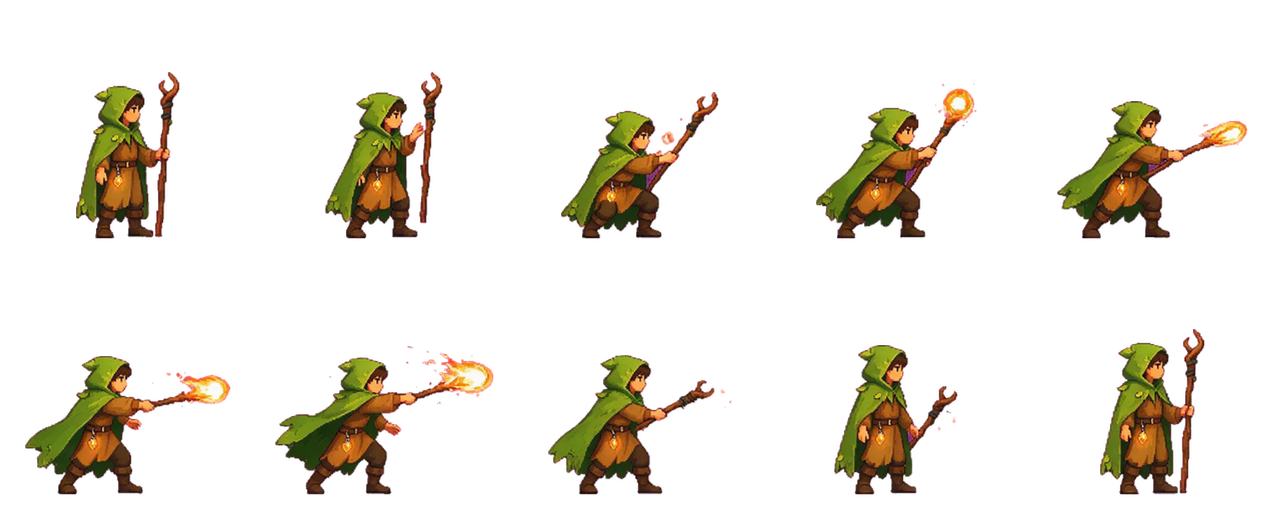
Your editor utility can submit a description, check the task and retrieve the result without a separate round of browser downloads. Save the project ID so the next animation belongs to the same character.
Give a saved sprite a clearer silhouette or change a visual detail. Revisions use an owned source version, letting your tool keep the original alongside the new result for review.
Adjust timing and download the accepted animation from your asset utility. The PNGs and metadata are available to your importer; you decide how they map to your engine’s animation settings.
Sign in with Google at the developer portal. Name your key, choose its permissions and expiry, then copy it while it is shown. Keep it on your server and send it as a Bearer token.
For read-only access, choose account:read to inspect your Credits and assets:read to find projects, tasks and saved sprites. Add jobs:write for generation, reference uploads or timing changes. Exports need exports:write; cancellation has its own jobs:cancel permission. Give each integration a separate key so you can retire one tool independently. A missing permission returns 403; an expired or revoked key returns 401. For an existing task, keep its job ID and read it with an active key that has asset access.
API generations use your existing account balance. Every generation requires max_credits; if the planned cost exceeds that ceiling or your available budget, it cannot proceed to generation. Credits are settled after a usable result is delivered. Reading your account, adjusting timing and exporting an animation use no generation Credits.
You can set separate account and key budgets in the portal, and revoke a key when an integration is retired. New accounts receive 50 trial Credits that expire after 30 days.
View Credit plans →Yes. Request a private upload ticket, upload the actual PNG, JPEG or WebP, then send its reference_image_id with your generation. Images can be up to 3 MB, 4096 pixels per side and 16 million decoded pixels. Uploaded references expire after seven days; arbitrary image URLs are not accepted.
Keep the same Idempotency-Key and the same request body when retrying that submission. A new creative request needs a new key. Poll the accepted job rather than creating another generation to recover a missing response. A changed body with the old key returns a conflict.
Launch limits allow one unfinished generation per account, three new submissions per minute and 30 accepted tasks per UTC day. API keys allow 120 requests per minute. The default daily generation budget is 100 Credits; account and key budgets can be adjusted up to 1000 in the developer portal.
Commercial use requires payment under the SpriteFuse terms. Free generations are for personal, non-commercial evaluation. Review the current plans and terms before publishing assets in a commercial project.
Read the termsStart with an account read, then add generation when you are ready.
Building with an AI agent? Connect the MCP server →