 SpriteFuseMake a tileset
Tileset Maker
Create pixel-art terrain with an AI tileset maker. Describe two ground materials, preview their connections, then refine details in your workspace.
Generated terrain previews
Tileset maker examples for your next game
A trail through a forest, a shoreline or worn stone ground. These examples show how two materials meet across straight edges, bends and corners.
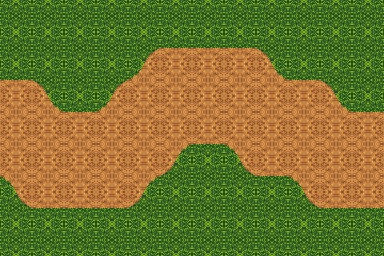
Forest trail
“Forest grass and a dry dirt path, warm pixel art.”
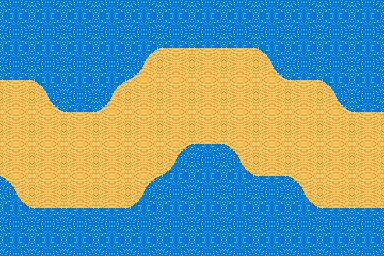
Sandy shoreline
“Calm blue water and golden sand, warm pixel art.”
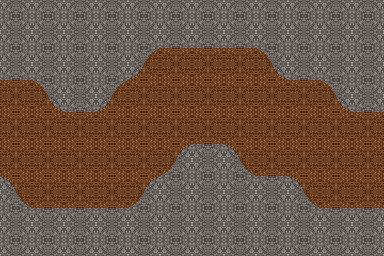
Worn stone ground
“Gray stone floor and brown earth, warm pixel art.”
How it works
How to use the tileset maker
- Describe
Name two ground materials and the look you want. A reference image is optional.
- Inspect
Generate the set and check the terrain preview. Look at both the broad pattern and the small details.
- Take it further
Download the pack, or continue editing the same tileset in your workspace.
Refine the details
Edit one tile.
Keep its connected edges.
Open your tileset maker result in the workspace, select a tile and describe the change you want. Its connecting border stays in place, and the other fifteen tiles stay the same. The comparison shows an actual single-tile revision.
Need a different direction for the whole set? Ask for a full revision instead. Earlier successful versions remain available, so you can compare ideas before choosing what to export.


One selected tile · original border retained
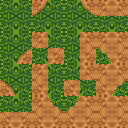
16 tiles · 32×32 px · 128×128 px atlas
Output files
Tileset maker exports for your map editor
One ZIP keeps the artwork and terrain information together.
- PNG atlas
- The complete set in one regular grid.
- Individual tiles
- Sixteen separate PNGs for your own asset workflow.
- Tiled rules + JSON
- Corner terrain assignments and tile information.
- Terrain preview
- A connected test patch to inspect beside your game.
Using the pack in a map editor
Extract the tileset maker ZIP before importing. Keep tileset.tsx next to tileset.png; the Tiled definition points to that image and describes a two-color corner terrain set. Use Tiled’s Terrain Brush to lay out connected terrain, then check the result at your game’s display scale. The preview is a demonstration of connections, not a level file. Add collision and gameplay rules in the editor where you build your map.
For small 2D projects
Build a prototype with connected terrain
Test a playable route
Block out where players can travel and how one surface leads into another. Try the ground in a small top-down scene before expanding the level.
Replace placeholder art
Bring a rough level closer to its intended mood. Judge the terrain beside your existing sprites, where color and scale matter most.
Explore a new biome
Use the tileset maker to compare an alternate material pair for a new area of your game. Start with the ground layer, then add scenery and props in your editor.
FAQ
Before you make your first tileset
Is the AI tileset maker free to try?
New accounts receive 50 starter Credits, valid for 30 days. The tileset maker uses 8 Credits for a new set, or 9 with a reference image. You can browse the examples and write your description before signing in. Generate requires an account and enough Credits. Further generations and edits use Credits too. Check the amount shown in the workspace before sending an edit. See current Credit options.
What should I put in my description?
Tell the tileset maker which two surfaces meet, then add a few words about the look you want. For example: “Dark volcanic rock and orange lava, chunky pixel art.” Ground materials work better than a description of an entire scene with buildings, people and objects. You do not need to name corner patterns or arrange a tile grid. If you leave the style unspecified, SpriteFuse chooses a starting style for you.
Can I use an image to guide the style?
Yes. In the tileset maker, attach one PNG, JPEG or WebP, up to 2.5 MB, with the optional Reference button. A small crop showing the colors and texture is a useful starting point. The image guides a new generation; it is not imported as an existing editable tileset, and an exact palette or pixel-for-pixel match is not guaranteed. Use a reference you have permission to upload.
Does this create a full map or a 47-tile blob set?
This tileset maker creates a fixed 16-tile corner set for two materials, viewed from above. Each tile is 32×32 pixels. The terrain preview arranges those pieces to show their connections; it is not a saved level layout. This set is different from a 47-tile blob set or an RPG Maker autotile sheet. Build your complete map in your map editor. Isometric terrain, animated water and collision shapes are not included.
Can I use the files in Godot or Unity?
PNG files from the tileset maker can be imported into either engine as images. For the atlas, use a 32×32 grid and keep texture filtering appropriate for pixel art. Godot terrain assignments and Unity tile rules need to be configured in those editors; this download does not include a native Godot resource or Unity package. The Tiled TSX is a separate terrain definition, not a universal engine project. Check scale, seams and collisions in your own scene.
Can I reopen a tileset or recover an earlier version?
Yes. Every tileset maker result belongs to a Project. Sign in to the same account and reopen it in the workspace. Successful revisions remain in the version menu. Select the version you want to view or export; a failed revision keeps the previous successful result available. Downloading a ZIP does not create a new generation. Keep the exported files together when moving them, so the Tiled definition can still find its atlas.
Can I use the generated terrain in a commercial game?
Commercial use of tileset maker output requires payment. Free generations are for personal, non-commercial evaluation. You must also have the necessary rights to any uploaded reference. Review the result before publishing and check the SpriteFuse Terms for the conditions that apply to your project. Read the Terms.