 SpriteFuse
GameMaker Sprite Sheet Generator
Describe a character and one action. SpriteFuse draws it as a transparent GameMaker sprite sheet with 256 × 256 px cells and the feet on one line, ready for Convert to Frames.
Try it free. Start with text or upload a character.
How to format a sprite sheet for GameMaker
GameMaker reads two layouts. A single row named with a _stripN suffix, like spr_frog_walk_strip8.png, is split into N frames as soon as you drop it into the Asset Browser. A grid of several rows is split with Convert to Frames. SpriteFuse exports a grid, so the steps below use Convert to Frames. Either way, the sheet follows four rules.
Same size for every frame
GameMaker splits a sheet into equal cells. If one frame is wider than the rest, every frame after it is cut in the wrong place.
No gaps, no outer margin
Put the cells edge to edge from the top-left corner. Then the offset and separation fields can stay at zero.
A transparent PNG
GameMaker keeps the alpha channel, so there is no background colour to remove after import.
The feet on one line
Every frame needs the ground in the same place, or the origin cannot hold the character still.
Import a sprite sheet into GameMaker in five steps
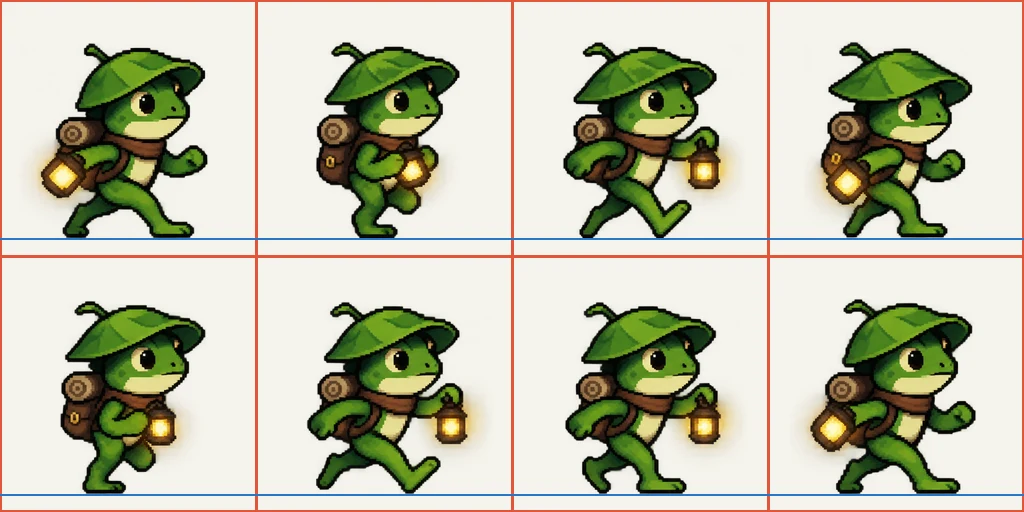
These are the settings for the frog walk sheet shown here. Your own sheet uses the same cell size; only the number of frames and frames per row change with the action.
Create the sprite and import the sheet
Make a new Sprite asset, for example spr_frog_walk. In the Inspector choose Import Strip and pick sprite-sheet.png. GameMaker opens the Convert to Frames window.
Fill in Convert to Frames
For the 8-frame frog: Number of Frames 8, Frames Per Row 4, Frame Width 256 and Frame Height 256. Leave the cell offsets and separation at 0. The preview outlines each frame; press Convert.
Put the origin at the feet
In the Sprite Editor set the origin to Custom: x 128, y 238. That is the middle of the cell, 18 px above its bottom edge, where every SpriteFuse frame stands.
Set the frame speed
Set Frame Speed to 5 frames per second, the timing the export lists for this walk. Faster actions list their own number in animation.json.
Use it in an object
Give an object the sprite, or switch with sprite_index = spr_frog_walk in the Step event. Set image_xscale to -1 to walk the other way.
Why the origin decides whether the walk looks right
GameMaker draws every frame of a sprite from its origin. With the default top-left origin, or a centre origin on frames whose feet move up and down, the character slides and bobs as it animates, and flipping it with image_xscale makes it jump sideways. SpriteFuse places every frame on the same ground line and writes that line into animation.json as feetBaseline. Set the origin on that line once and every action made from that character, walk, idle or attack, lands on the same floor.
What comes with each sprite sheet
The result on this page downloads as one transparent PNG. Open the project with Continue editing to get the full export ZIP.
sprite-sheet.pngThe transparent grid, read left to right, then top to bottom: the order Convert to Frames uses.
frames/One transparent PNG per frame. Drag them into a sprite together to skip Convert to Frames.
animation.jsonGrid, timing, pivot, feet baseline and loop setting, for a script or an import tool.
animation.gifA quick preview you can check or share before importing.
Fix the motion before it reaches your project
Play the preview once before you import anything. If the stride is too short or an attack needs more wind-up, ask for that change in the editor. SpriteFuse keeps the same character, so the next sheet comes back with the same look and cell size, and you only redo Convert to Frames with the new frame count.
- “Make the stride longer.”
- “Keep the lantern inside the frame.”
- “Hold the last pose one beat longer.”
Made for 2D games in GameMaker
SpriteFuse is for developers who need a character action and would rather not draw every frame first. Describe a new character, or upload a reference image to keep a design you already have, and one generation turns one action of up to 25 frames into a sprite sheet.
Godot sprite sheet generator
Same sheets, with the steps for Godot 4.
Unity sprite sheet generator
Same sheets, with the steps for Unity 6.
Sprite sheet cutter
Split a sheet you downloaded elsewhere into single frames.
GameMaker sprite sheet FAQ
How do I format a sprite sheet for GameMaker?
Use one transparent PNG where every frame is the same size, with no gaps between cells. A single row can be named with a _stripN suffix, like spr_frog_walk_strip8.png, and GameMaker splits it on import. A grid of rows is split in the Image Editor with Image > Convert to Frames.
Is the GameMaker sprite sheet generator free?
New accounts get 20 free Credits to use within 30 days, enough for about two animations. A new character with an 8-frame animation costs 7 Credits, and the Generate button shows the price before you start. Credits are only used when a usable result finishes. After that, packs start at $9 for 60 Credits.
Why does my sprite slide or bob when it animates?
The sprite origin is in the wrong place. GameMaker draws every frame from the origin, so set it at the feet: x 128 and y 238 for a 256 × 256 SpriteFuse cell. Every frame shares that feet line, so the character stays on the floor.
Why is my pixel art blurry in GameMaker?
Texture interpolation is on. Turn off Interpolate colours between pixels in Game Options > Graphics for your target platform, and keep the room and camera at a whole-number scale of the sprite.
What size is each frame?
Every cell is 256 × 256 pixels with a transparent background. Type 256 into Frame Width and Frame Height in Convert to Frames. The full PNG grows with the number of columns and rows the action needs.
Can I sell a game that uses these sprites?
Paid Credit packs and plans include commercial use. See the current terms on Pricing.
Make your first GameMaker sprite sheet
Describe one character and one action. You will see the full motion before you download anything.
Generate a sprite sheet