 SpriteFuse
Unity Sprite Sheet Generator
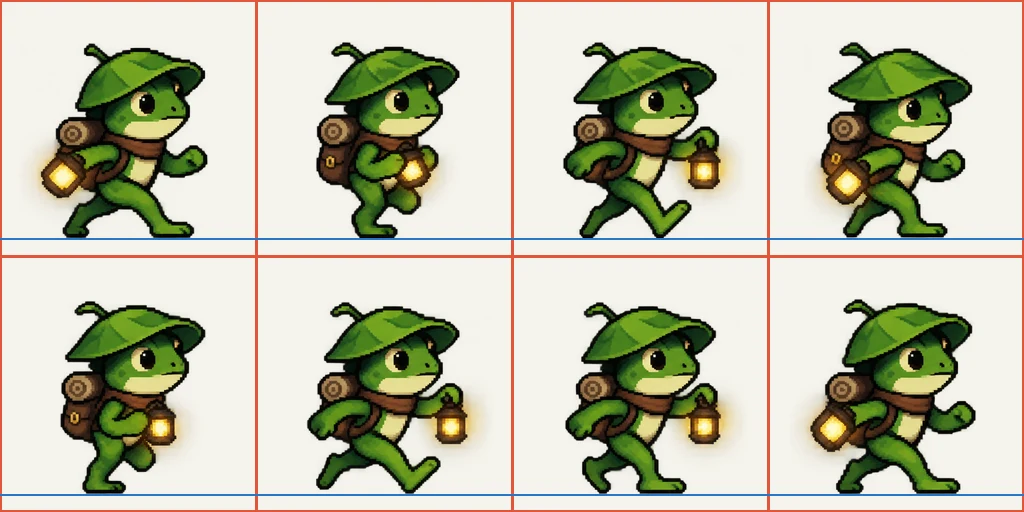
Describe a character and one action. SpriteFuse draws it as a transparent Unity sprite sheet with 256 × 256 px cells and the feet on one line, ready to slice in the Sprite Editor.
Try it free. Start with text or upload a character.
A SpriteFuse frog walking in a real Unity scene
This clip was recorded in Unity 6. We asked SpriteFuse for a small frog adventurer with a leaf hat and a glowing lantern, imported the 8-frame Unity sprite sheet, sliced it with the settings below and ran the game as a Mac build. Nothing was redrawn or nudged by hand. The walk plays at 5 frames per second, the same timing the export lists.
The feet stay on the path because every frame shares one baseline. The forest is stand-in art; the frog is the SpriteFuse output.Set up a Unity sprite sheet in five steps
Every SpriteFuse export includes a README with these steps filled in for your Unity sprite sheet: the real cell size, the frame timing and the pivot. This is what they look like in the editor.
Import it as a sprite
Drop sprite-sheet.png into Assets. In the Inspector set Texture Type to Sprite (2D and UI), Sprite Mode to Multiple and Compression to None. For pixel art, set Filter Mode to Point (no filter), or the edges turn soft.
Slice by cell size
Open the Sprite Editor, choose Slice, and set Type to Grid By Cell Size with a Pixel Size of 256 × 256. Every SpriteFuse cell is that size, whatever the action.
Put the pivot at the feet
Set Pivot to Custom and Custom Pivot to (0.5, 0.0703). That is the feet line from animation.json, 18 px above the bottom of the cell. Slice, then Apply.
Build the clip
Add a GameObject with a Sprite Renderer, open Window > Animation > Animation and create a clip. Turn on Show Sample Rate, set it to 5, and drag sprite-sheet_0 to sprite-sheet_7 onto the timeline.
Loop it
Select the clip in the Project window and turn Loop Time on for walks and idles. Leave it off for one-shot attacks, then wire the clips into your Animator.
Why the walk doesn't bob up and down
A Unity sprite animation looks wrong when the character changes height between frames. With the default center pivot, every frame lines up by its middle, so a raised arm or a long stride moves the feet. SpriteFuse places every frame on the same ground line and writes that line into animation.json as feetBaseline. Set the custom pivot once and every clip made from that character lands on the same floor, whether it is a walk, an idle or an attack. The same line is in every Unity sprite sheet SpriteFuse makes, so a new action never needs a new pivot.
Sprite Renderer or UI Image? Both work
Both read the same Unity sprite sheet. Cell size and order do not change, so you can switch later without exporting again.
Sprite Renderer with an Animator
The usual route for characters in the scene. Each clip becomes a state in the Animator Controller, and one parameter switches between walk, idle and attack.
UI Image for menus and portraits
For a character on a title screen or in a dialogue box, put the sliced sprites on a UI Image and animate its Source Image property in a clip. The frame order is the same.
What comes with each Unity sprite sheet
The result on this page downloads as one transparent PNG. Open the project with Continue editing to get the full export ZIP.
sprite-sheet.pngThe transparent grid, read left to right, then top to bottom. Its slices come out named sprite-sheet_0, sprite-sheet_1 and so on, in playback order.
frames/One transparent PNG per frame, for anyone who prefers to build a Unity sprite sheet animation from loose sprites.
animation.jsonGrid, timing, pivot, feet baseline and loop setting, ready for an editor script or an import tool.
animation.gifA quick preview you can check or share before importing.
README.txtUnity and Godot 4 import steps written for that exact sheet.
Fix the motion before it reaches your project
Play the preview once before you slice anything. If the stride is too short, the lantern clips the edge of a cell, or an attack needs more wind-up, ask for that change in the editor. SpriteFuse keeps the same character, so the next Unity sprite sheet comes back with the same look and cell size, and you re-import one file. Unity keeps your slice settings when the texture changes.
- “Make the stride longer.”
- “Keep the lantern inside the frame.”
- “Hold the last pose one beat longer.”
Made for 2D games in Unity
SpriteFuse is for developers who need a character action and would rather not draw every frame first. Describe a new character, or upload a reference image to keep a design you already have, and one generation turns one action of up to 25 frames into a Unity sprite sheet.
Godot sprite sheet generator
Same sheets, with the steps for Godot 4.
Sprite sheet cutter
Split a sheet you downloaded elsewhere into single frames.
RPG sprite sheet generator
Make four- or eight-direction walks for top-down games.
Unity sprite sheet FAQ
Is the Unity sprite sheet generator free?
New accounts get 20 free Credits to use within 30 days, enough for about two animations. A new character with an 8-frame animation costs 7 Credits, and the Generate button shows the price before you start. Credits are only used when a usable result finishes. After that, packs start at $9 for 60 Credits.
Which Unity versions does it work with?
The steps are written for Unity 6 and match Unity 2021 and 2022 LTS, where the Sprite Editor and Animation window work the same way. The sheet itself is a standard transparent PNG grid.
Why does my sprite look blurry in Unity?
Unity filters textures with Bilinear by default and compresses them. Set Filter Mode to Point (no filter) and Compression to None on the sheet, and keep Pixels Per Unit the same across your sprites so they scale evenly.
Why are my frames cut off or shifted when I slice?
Usually the slice type is Automatic or the cell size is wrong. Use Grid By Cell Size at 256 × 256 and leave Offset and Padding at zero.
What size is each frame?
Every cell is 256 × 256 pixels with a transparent background. The full PNG grows or shrinks with the number of columns and rows the action needs.
Can I sell a game that uses these sprites?
Paid Credit packs and plans include commercial use. See the current terms on Pricing.
Make your first Unity sprite sheet
Describe one character and one action. You will see the full motion before you download anything.
Generate a sprite sheet