 SpriteFuse
Godot Sprite Sheet Generator
Describe a character and one action. SpriteFuse draws it as a transparent Godot sprite sheet with 256 × 256 px cells, ready to slice into an AnimatedSprite2D.
Try it free. Start with text or upload a character.
A SpriteFuse sheet walking in a real Godot scene
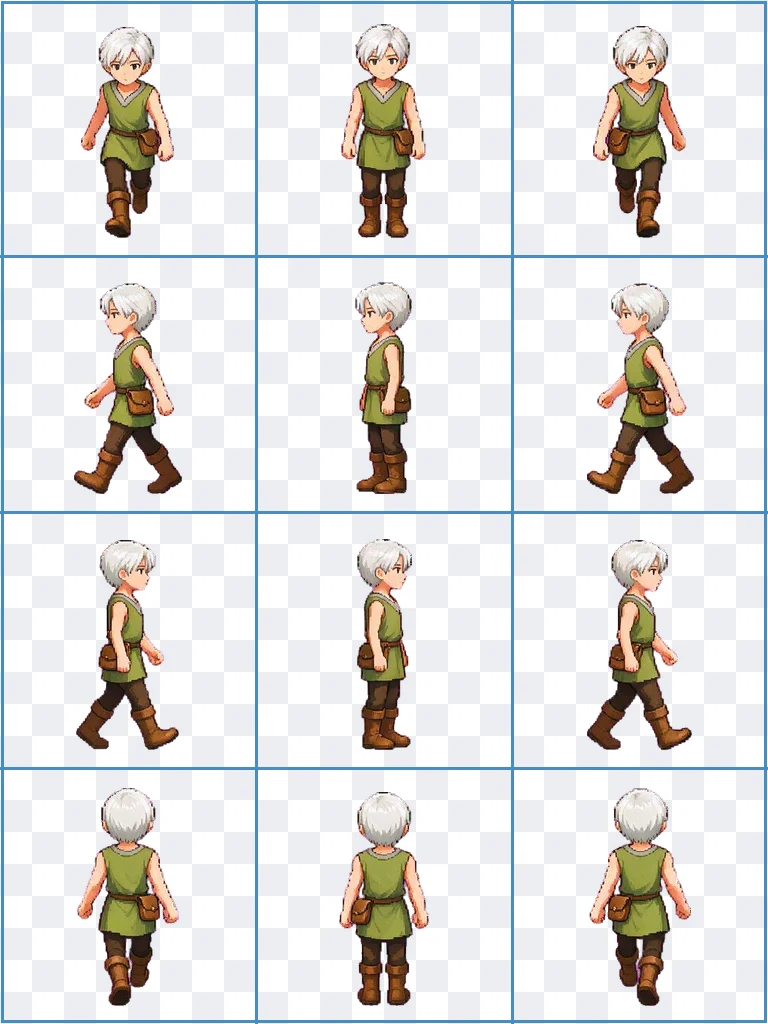
This clip was recorded in Godot 4.7. We took a 12-frame RPG walk that SpriteFuse generated, loaded it as one SpriteFrames resource, and captured the running game. Each row of the Godot sprite sheet became its own animation: walk_down, walk_left, walk_right and walk_up, playing at 6 frames per second with texture filtering off.
A short script picks the row that matches the direction of travel. That is all the code the walk needs.Set up a Godot sprite sheet in five steps
Every SpriteFuse export includes a README with these steps filled in for your Godot sprite sheet: the real column and row count, the frame timing and the pivot. This is what they look like in the editor.
Turn texture filtering off
Select sprite-sheet.png in the FileSystem dock and set Filter to Nearest, or change the default texture filter in Project Settings. Linear filtering is the reason pixel art looks soft in Godot.
Create an AnimatedSprite2D
Add the node, choose New SpriteFrames in its Sprite Frames property, and open the SpriteFrames panel at the bottom of the editor.
Add frames from the sprite sheet
Click Add frames from a Sprite Sheet, pick the PNG, and enter the Horizontal and Vertical counts from the README. The walk above is 3 × 4. A spell cast might be 4 × 2, because SpriteFuse sizes the grid to the action.
Select the cells in row order
Click the cells left to right, then top to bottom, and set the FPS. If animation.json lists a different duration for some frames, set those durations in the panel too.
Line up the feet and set looping
animation.json gives a pivot and a feetBaseline in pixels from the top-left corner. Offset the sprite once so that baseline sits on your floor or collision shape. Turn looping on for walks and idles, and off for one-shot attacks.
AnimatedSprite2D or Sprite2D? Both work
Both nodes read the same Godot sprite sheet. Cell size and order do not change, so you can switch later without exporting again.
AnimatedSprite2D
The fastest route for character moves. Each row of the sheet becomes a named animation in the SpriteFrames panel, and one call to play() switches between them.
Sprite2D with an AnimationPlayer
Use this if your project already runs everything through an AnimationPlayer. Assign the sheet, set Hframes and Vframes to the column and row count, and key the frame property.
What comes with each Godot sprite sheet
The result on this page downloads as one transparent PNG. Open the project with Continue editing to get the full export ZIP.
sprite-sheet.pngThe transparent grid, read left to right, then top to bottom.
frames/One transparent PNG per frame in playback order, for anyone who prefers to drag frames into SpriteFrames by hand.
animation.jsonGrid, timing, pivot, feet baseline and loop setting, ready for a script or an import plugin.
animation.gifA quick preview you can check or share before importing.
README.txtGodot 4 and Unity import steps written for that exact sheet.
Fix the motion before it reaches your project
Play the preview once before you slice anything. If the wind-up is too short, the feet slide, or an effect touches the edge of a cell, ask for that change in the editor. SpriteFuse keeps the same character, so the next Godot sprite sheet comes back with the same look and the same cell size, and you re-import one file.
- “Hold the cast pose one beat longer.”
- “Keep the feet planted during the swing.”
- “Make the walk cycle 6 frames instead of 4.”
Made for 2D games in Godot 4
SpriteFuse is for developers who need a character action and would rather not draw every frame first. Describe a new character, or upload a reference image to keep a design you already have, and one generation turns one action of up to 25 frames into a Godot sprite sheet.
Sprite packer
Already have the frames? Build a sheet from them.
Sprite sheet cutter
Split a sheet you downloaded elsewhere into single frames.
RPG sprite sheet generator
Make four- or eight-direction walks like the one above.
Godot sprite sheet FAQ
Is the Godot sprite sheet generator free?
New accounts get 20 free Credits to use within 30 days, enough for about two animations. A new character with an 8-frame animation costs 7 Credits, and the Generate button shows the price before you start. Credits are only used when a usable result finishes. After that, packs start at $9 for 60 Credits.
Does it work with Godot 3?
The README steps are written for Godot 4, with AnimatedSprite2D and SpriteFrames. The sheet itself is a standard transparent PNG grid, so Godot 3 can still slice it with its own sprite tools; the menu names differ.
Why does my pixel art look blurry in Godot?
Godot filters textures linearly by default. Set the texture's Filter to Nearest, or change the default in Project Settings, and the edges stay sharp at any zoom. Scale the node rather than the image.
What size is each frame?
Every cell is 256 × 256 pixels with a transparent background. The full PNG grows or shrinks with the number of columns and rows the action needs.
What is the feet baseline for?
SpriteFuse places every frame on the same ground line, so a walk does not bob up and down. animation.json reports that line, which lets you offset the AnimatedSprite2D once and have every animation of the character land on the same floor.
Can I sell a game that uses these sprites?
Paid Credit packs and plans include commercial use. See the current terms on Pricing.
Can I use the same sheet in Unity?
Yes. The README in each export also lists Unity steps: Sprite Mode Multiple, Filter Mode Point, and Slice by Grid By Cell Size at 256 × 256. The Unity sprite sheet page walks through every step.
Make your first Godot sprite sheet
Describe one character and one action. You will see the full motion before you download anything.
Generate a sprite sheet