 SpriteFuse
Slime Jump Sprite and 3 More Monster Jumps
Start from the slime, the frog, the mushroom or the bunny, or describe your own monster. Each jump is 8 frames, from crouch to landing, on a transparent sheet.
Try it free. Start with text or upload a character.
The short answer
A good slime jump sprite is mostly squash and stretch: flatten before take-off, stretch tall on the way up, go round at the top, stretch on the way down, then squash wide on landing. Eight frames is enough for one clear hop.
SpriteFuse makes a slime jump sprite from one sentence that lists those poses. The frames come back on a transparent sheet at one shared scale, and the same request works for any small monster, as the frog, mushroom and bunny below show.
A slime jump sprite and three more monster jumps
Each sheet is one SpriteFuse generation with no hand edits. All four face right and jump in place: your game moves the sprite up and down, the frames supply the pose.

Playing 
Sheet · 4×2 · 8 frames Slime
Frame 2 is the flattest and frame 6 the widest, the two squashes that make this slime jump sprite feel soft.
Described as
Cute round pink slime with a glossy highlight and two big black eyes; side view facing right. Polished 2D pixel art for an indie game: crisp dark outlines, limited harmonious palette, soft cel shading, clear readable silhouette, consistent proportions. Resting blob, squash flat to prepare, stretch tall leaving the ground, round at the top, falling slightly stretched, land and squash wide, bounce back a little, resting blob.
Playing 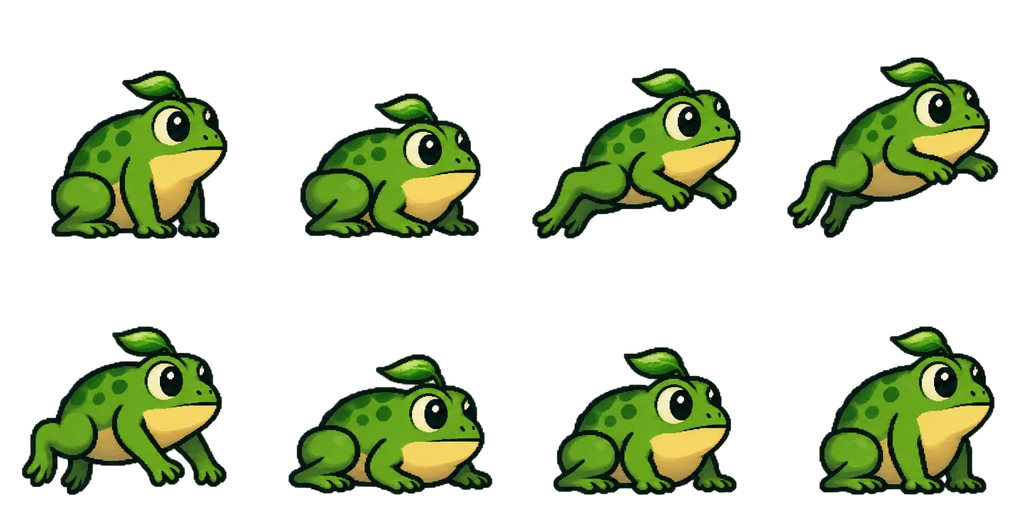
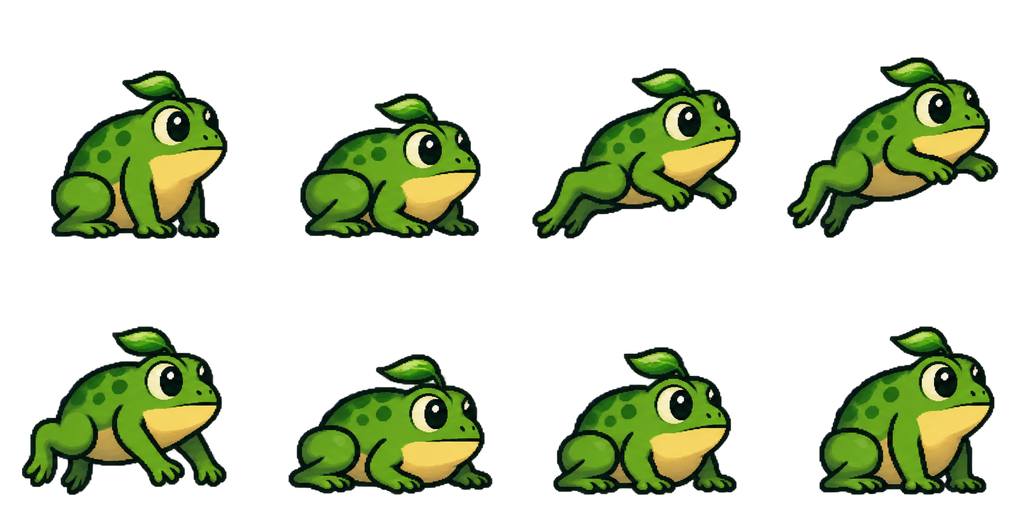
Sheet · 4×2 · 8 frames Frog
The back legs fully extend in frames 3 and 4, and the front legs reach for the ground before the landing.
Described as
Chubby green frog monster with a yellow belly, big round eyes and a tiny leaf on its head; side view facing right. Polished 2D pixel art for an indie game: crisp dark outlines, limited harmonious palette, soft cel shading, clear readable silhouette, consistent proportions. Sitting crouched, crouch lower with legs folded, push off with back legs stretching, airborne at the top with legs trailing, falling with front legs reaching down, land with the belly squashing, settle, sitting crouched.

Playing 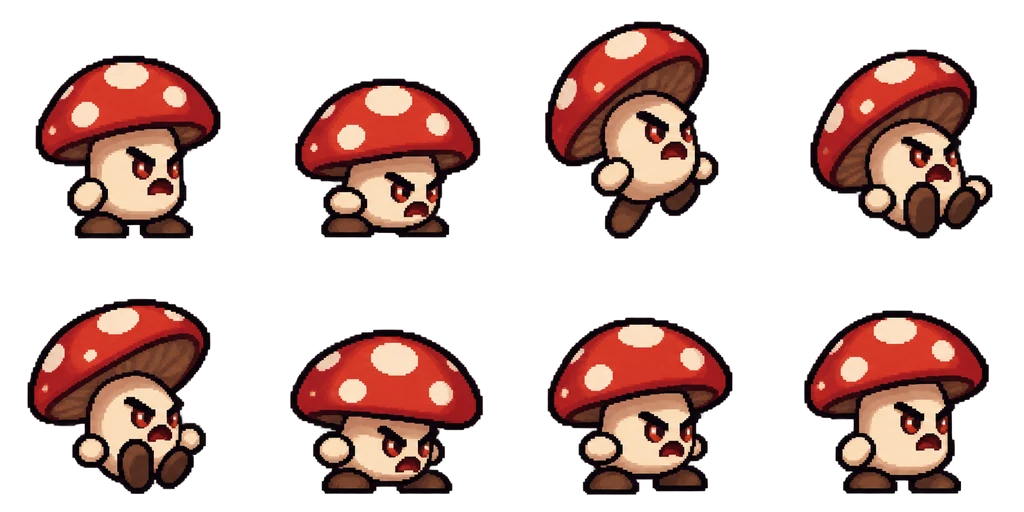
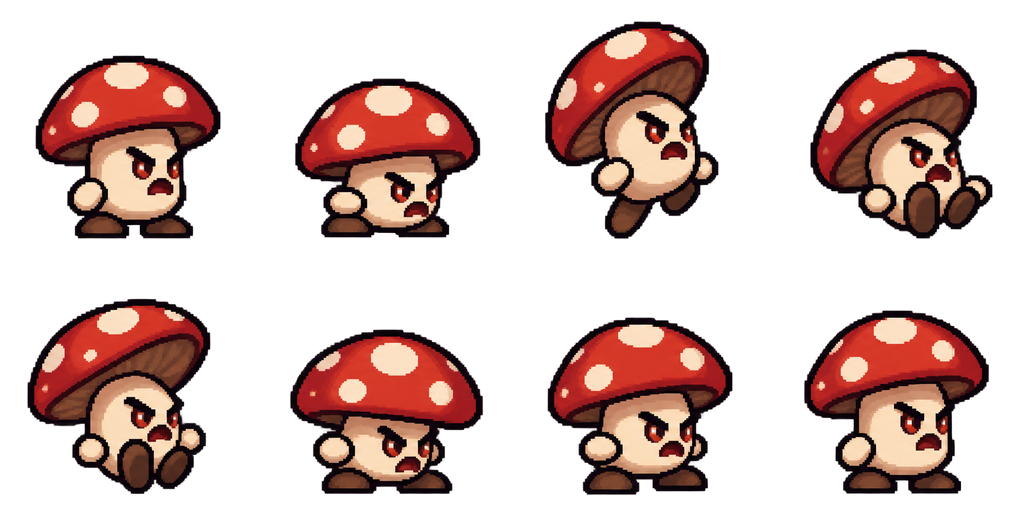
Sheet · 4×2 · 8 frames Mushroom
The cap tilts back on the way up and flares on the way down, so the follow-through is in the cap, not the body.
Described as
Small mushroom monster with a red cap with white spots, a cream stem body, stubby feet and an angry face; side view facing right. Polished 2D pixel art for an indie game: crisp dark outlines, limited harmonious palette, soft cel shading, clear readable silhouette, consistent proportions. Standing, bend the stem to crouch, spring up with the cap tilting back, airborne with feet tucked, falling with the cap flaring up, land with the stem squashing, wobble back up, standing.

Playing 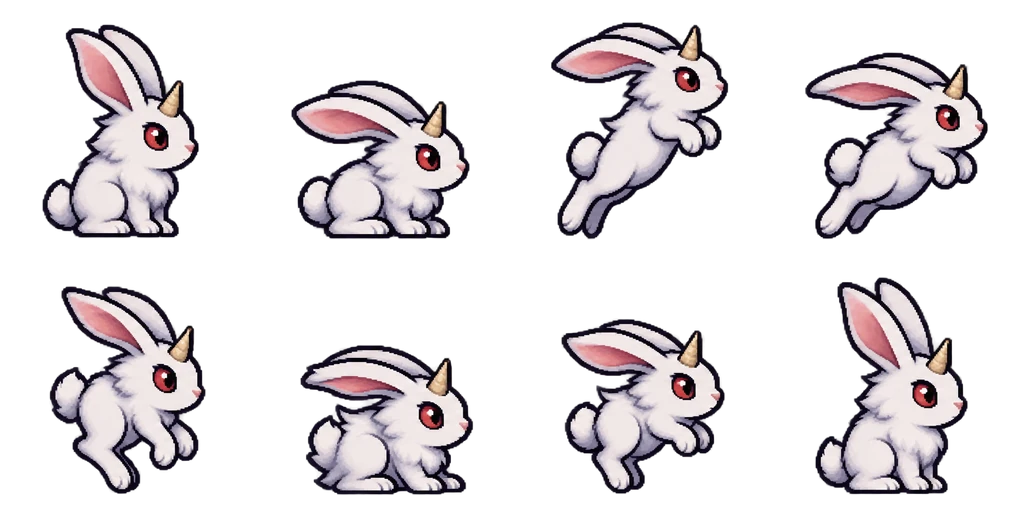
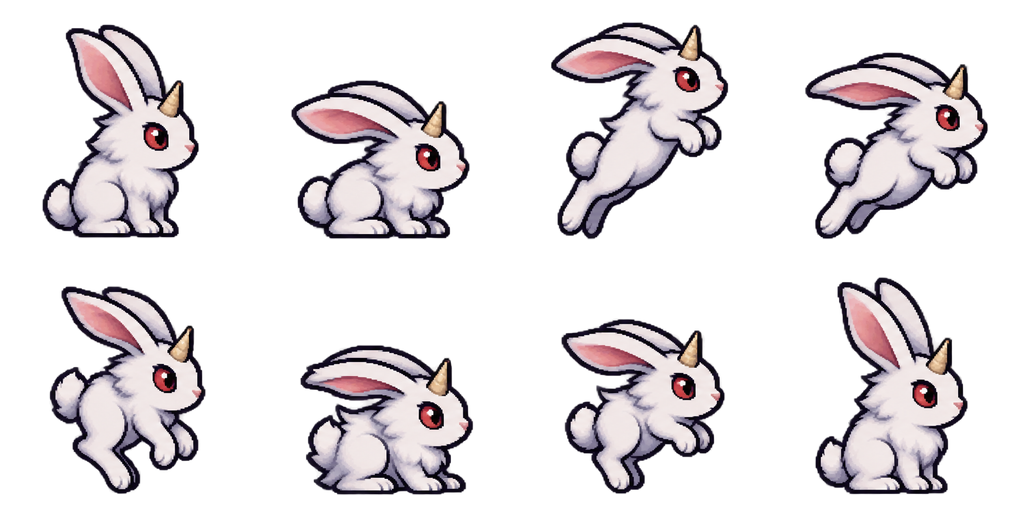
Sheet · 4×2 · 8 frames Horned bunny
The ears lag behind the body in every airborne frame, the detail that makes a jump look fast.
Described as
Fluffy white bunny monster with long ears, red eyes and a single small horn on its forehead; side view facing right. Polished 2D pixel art for an indie game: crisp dark outlines, limited harmonious palette, soft cel shading, clear readable silhouette, consistent proportions. Sitting, crouch with ears back, launch up with the body stretched, airborne with ears streaming, falling with legs reaching, land with the body squashing, a tiny hop, sitting.

What makes a slime jump sprite feel bouncy
A jump that only moves the sprite up and down looks stiff. The pose has to change through the hop, and these four rules come from the sheets above.
Squash before and after
One flat frame before take-off and one wide frame on landing. Keep the volume about the same, wider when flatter.
Stretch on the way up and down
Tall and thin while moving fast, round at the top where the monster almost stops.
Something that lags
Ears, a cap, a leaf or a tail that trails behind the body. It shows the speed without extra frames.
Jump in place
Keep the frames on one ground line and move the sprite in code. Then the same sheet works for a small hop or a big leap.
Timing the slime jump sprite in your engine
Play the frames once per jump, not on a loop. Hold the crouch frame until the jump starts, show the airborne frames while the sprite is rising and falling, and switch to the landing squash on contact with the ground. In Godot, Unity or GameMaker that means splitting the sheet into take-off, air and landing ranges, so the jump height can change without breaking the timing.
Make a slime jump sprite in four steps
Describe the monster
Shape, colors, eyes, and one part that can lag behind, like ears or a cap.
List the jump poses
Rest, squash, stretch up, top, stretch down, land squash, small bounce, rest: 8 frames.
Play it once
Check that the body keeps its size and the squashes are clear. Ask the editor to fix one frame if needed.
Download and split
Get the transparent PNG or single frames, then set take-off, air and landing ranges in your engine.
Jump animation questions
Why does the slime jump in place?
So the game controls the height. The frames carry the pose; your code moves the sprite, which keeps the same sheet usable for any jump height.
How many frames does a slime jump sprite need?
Six to eight. These use eight, which leaves room for a squash on both ends and a small bounce after landing.
Can I make my slime hop on a loop instead?
Yes. Ask for a slime jump sprite that loops and ends in the starting pose and keep the bounce small, and it works as a hopping walk.
Is it free to try?
New accounts get 20 free Credits to use within 30 days. A new monster with an 8-frame jump costs 7 Credits, so you can try 2. Packs start at $9 for 60 Credits.