 SpriteFuse
Sprite Sheet for RPG Maker MZ: 4-Direction Walking Characters
Pick one of the four characters below or describe your own. SpriteFuse makes the 3×4 walk in the row order RPG Maker MZ reads, and you download it at 48 px.
12 frames · Transparent PNG
The short answer
A walking sprite sheet for RPG Maker MZ holds one character in 3 columns and 4 rows. The rows face down, left, right and up; the columns are step, stand and the other step. The editor plays the middle column when the character stands still.
One character per file is the simplest setup. Start the file name with $, scale the cells to 48 × 48 px so the sheet is 144 × 192 px, and put it in img/characters. SpriteFuse generates the 3×4 walk from a text description and exports that file from its RPG sprite sheet generator.
Four real RPG Maker MZ walking sprites
Every sheet below came out of SpriteFuse with one request and no hand edits. Each one keeps the same four rows and three columns, so all four characters can share one event setup.
Playing 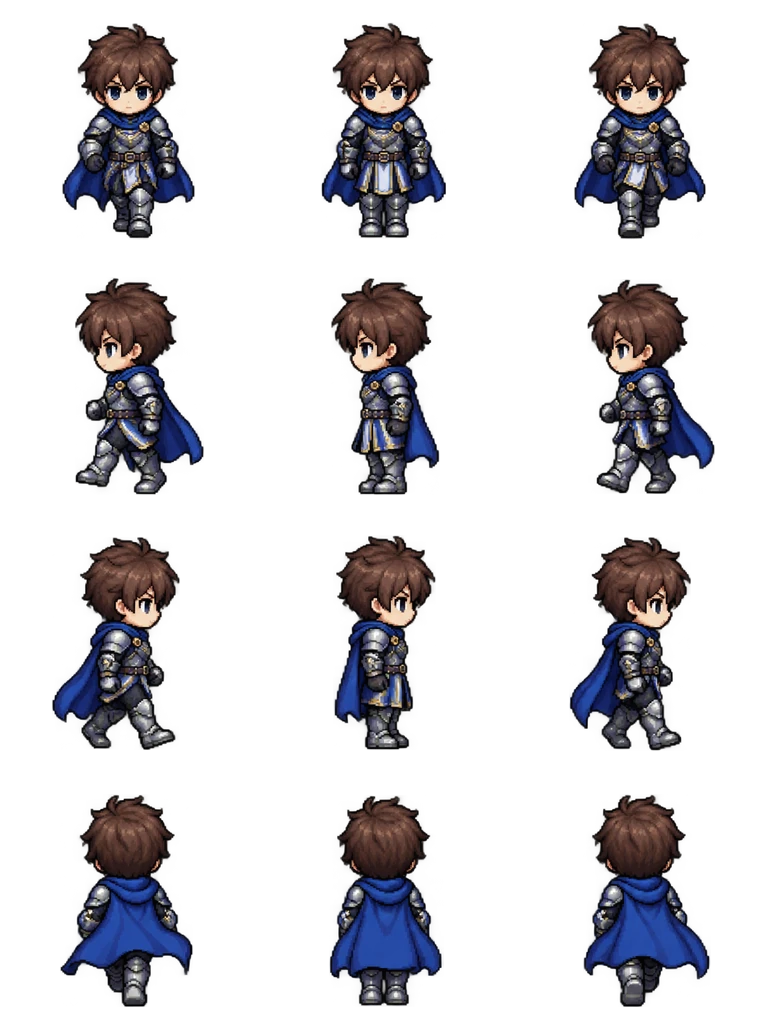
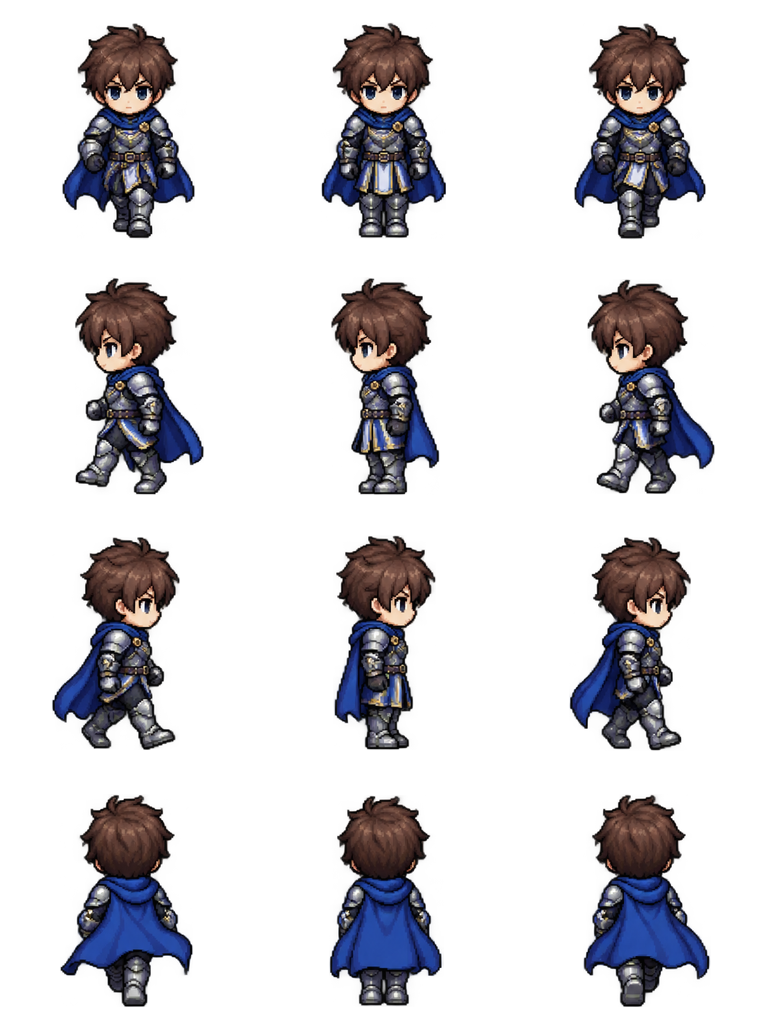
Sheet · 3×4 · 12 frames Knight
The cape stays on the far side in the left and right rows, and the back row hides the face completely.
Described as
Young knight with short brown hair, silver armor and a blue cape. Classic 16-bit JRPG map character style like RPG Maker MZ: chibi proportions, big head, crisp pixel art.

Playing 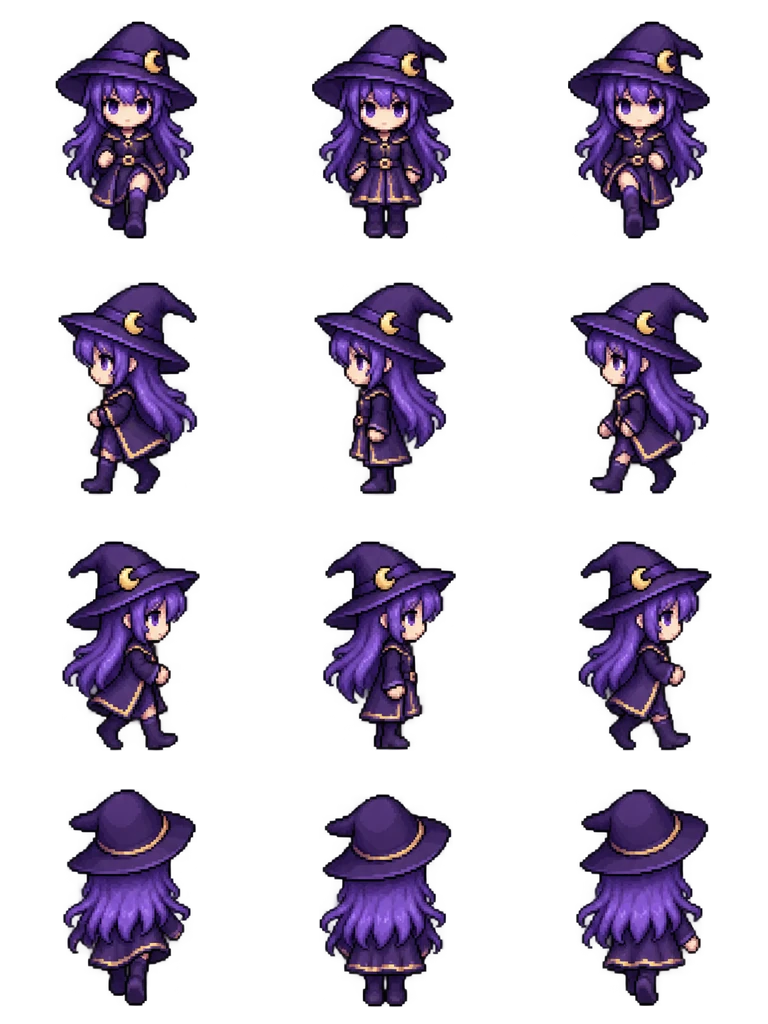
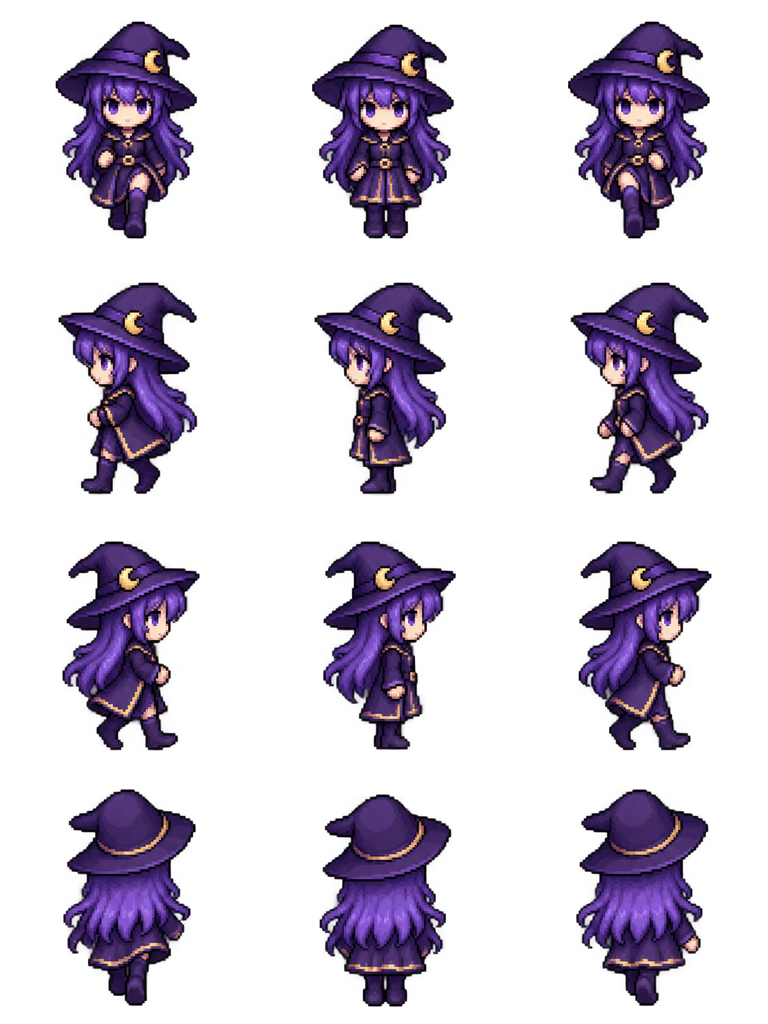
Sheet · 3×4 · 12 frames Mage girl
The long robe still shows a step in columns 1 and 3, which matters because skirts often hide the walk at 48 px.
Described as
Mage girl with long purple hair, a pointed witch hat and a purple robe. Classic 16-bit JRPG map character style like RPG Maker MZ: chibi proportions, big head, crisp pixel art.

Playing 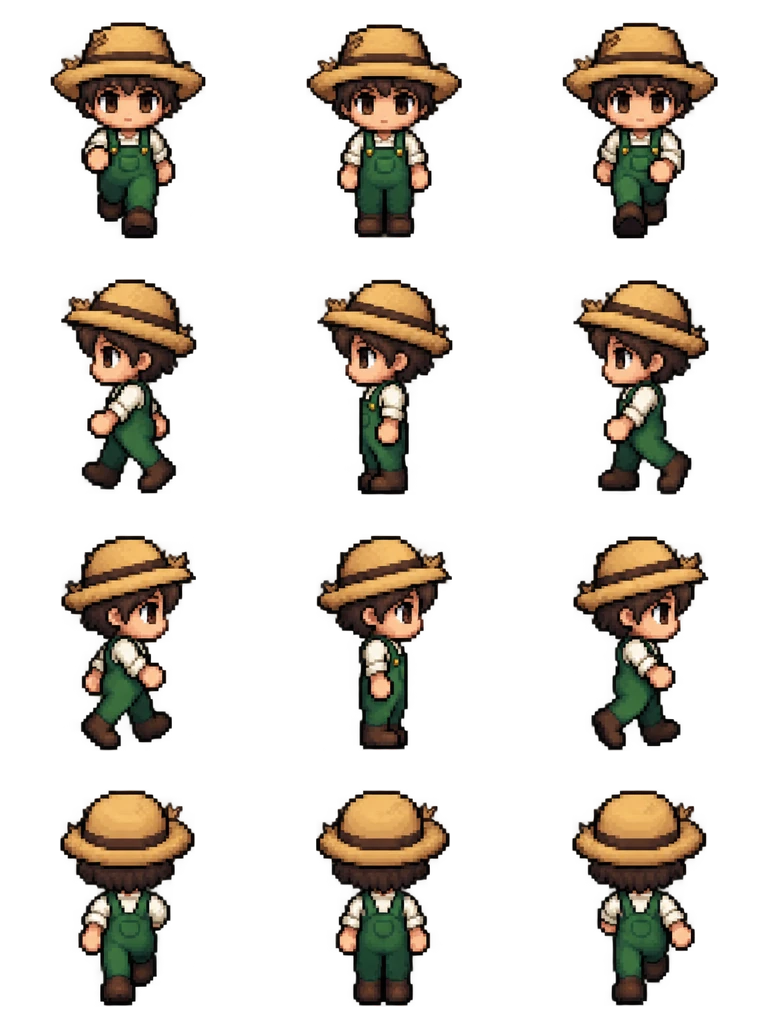
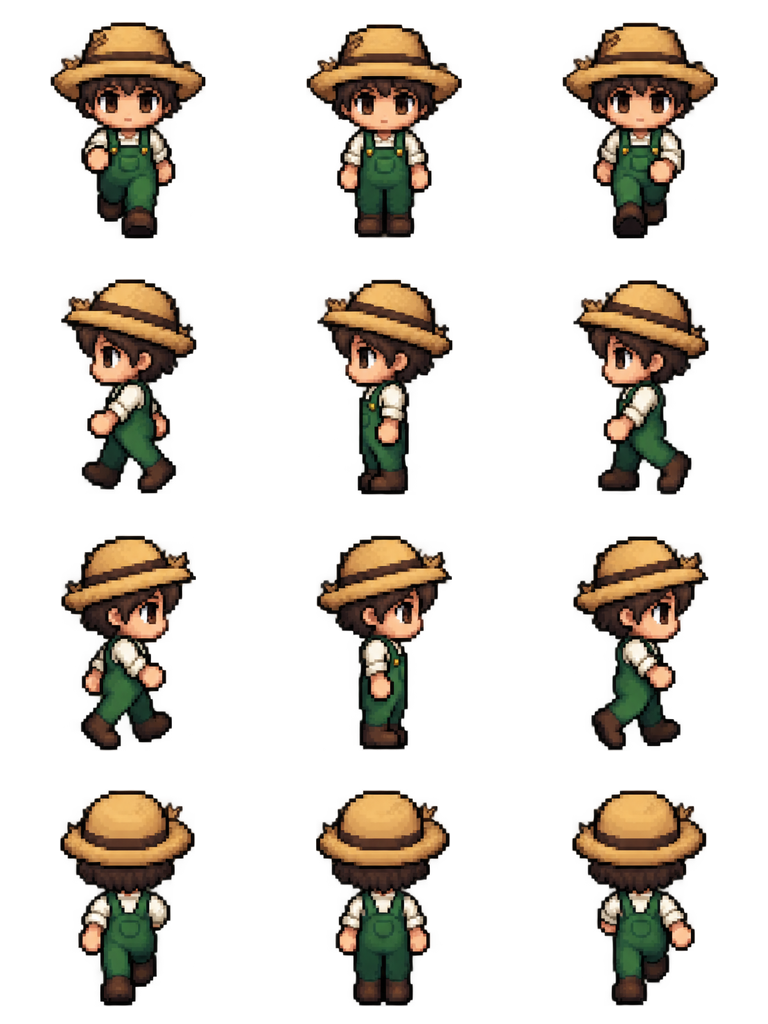
Sheet · 3×4 · 12 frames Farmer
The wide hat brim keeps its size in all 12 frames, so the head does not wobble.
Described as
Village farmer with a straw hat, green overalls and a white shirt. Classic 16-bit JRPG map character style like RPG Maker MZ: chibi proportions, big head, crisp pixel art.
Playing 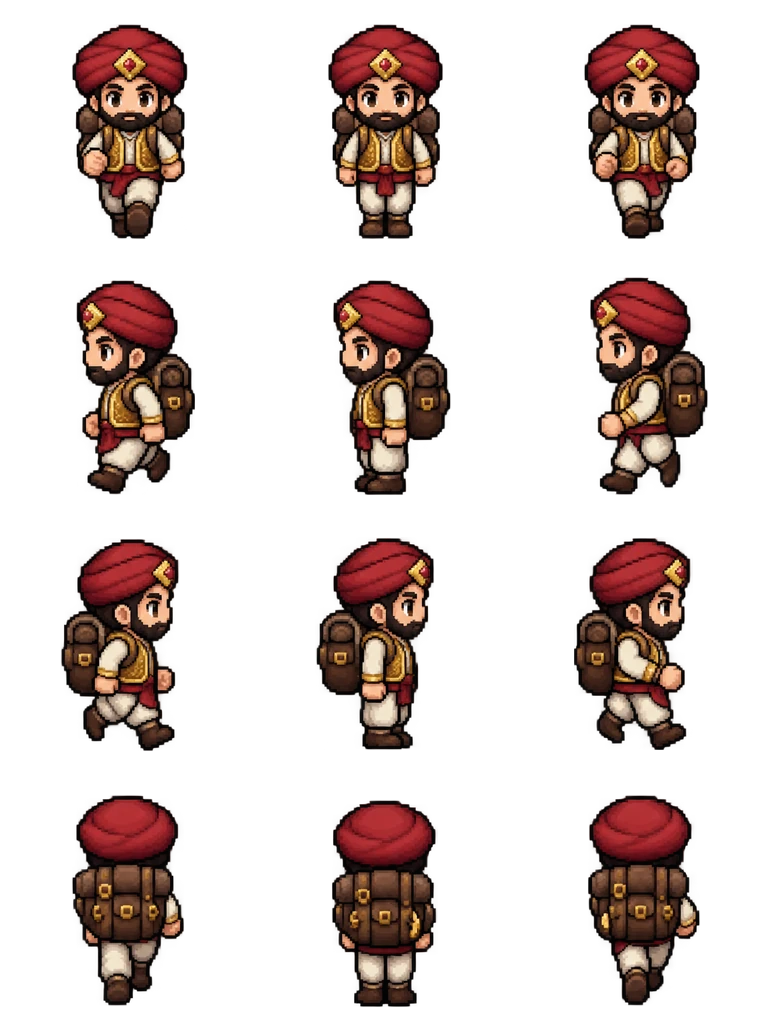
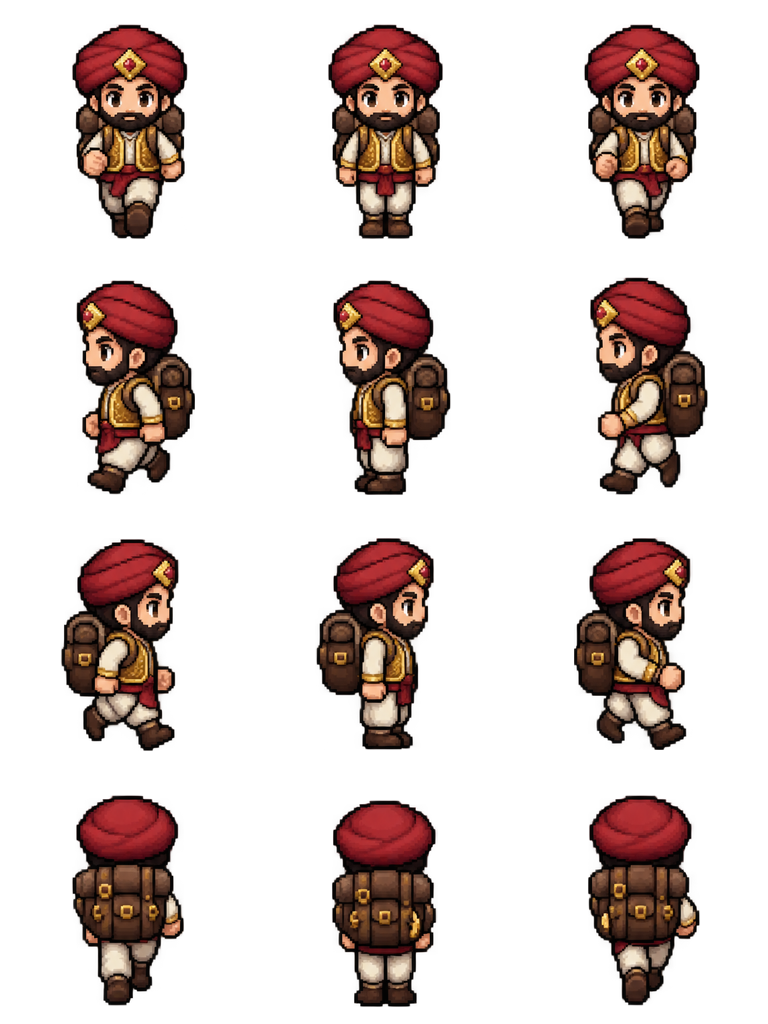
Sheet · 3×4 · 12 frames Merchant
The backpack moves to the correct side in every facing and fills the back row, a useful test for props.
Described as
Plump merchant with a red turban, gold vest and a big brown backpack. Classic 16-bit JRPG map character style like RPG Maker MZ: chibi proportions, big head, crisp pixel art.
What RPG Maker MZ expects from a character sheet
RPG Maker MZ reads character images from img/characters. A normal file holds eight characters in a 4×2 block; a file whose name starts with $ holds exactly one. Each character uses the same 3×4 grid, so the rules below apply to every sprite sheet for RPG Maker MZ you make or buy.
Rows: down, left, right, up
The first row faces the player, the second faces left, the third faces right and the last shows the back. A swapped row makes the character walk sideways into walls.
Columns: step, stand, step
The engine plays 2, 1, 2, 3 while walking and shows column 2 when the character stops. The stand pose belongs in the middle.
48 × 48 px cells
MZ draws map characters on a 48 px grid. SpriteFuse draws at 256 px and scales down with smoothing off, so check the face and hands at the real size.
Transparent background, feet on one line
Every SpriteFuse cell has a transparent background and the feet sit at the same height in all 12 frames, so the character does not bob on the tile.
Where these sheets need a look before you ship
At 48 px the big-head chibi style survives well, but thin details like the mage girl’s hat band and the merchant’s vest trim lose a few pixels. Check the exported file at 100% zoom and fix any stray pixel by hand. The 3×4 format is correct by construction; the direction of each pose is checked by eye, so play each row once before you import.
From description to an MZ event in five steps
Describe the character
Name the outfit, colors and one prop. “Chibi proportions, big head” keeps it close to the default MZ look.
Generate the 4-direction walk
Choose 4-direction walk. The result shows each facing separately so you can play down, left, right and up one at a time.
Download at 48 px
Pick 48 as the cell size. The file is named with a leading $, which tells MZ it holds one character.
Copy it into img/characters
Put the PNG in your project’s img/characters folder. MZ lists it the next time you open the image picker.
Assign it to an event or actor
Pick it as the event image, or set it as the actor’s character image in the Database, then playtest a walk in every direction.
RPG Maker MZ sprite sheet questions
What size is a sprite sheet for RPG Maker MZ?
One character is 3 columns × 4 rows of 48 × 48 px cells, so a single-character file with a $ name is 144 × 192 px. A full 8-character file is 576 × 384 px.
Do these sheets work in RPG Maker MV too?
Yes. MV uses the same 3×4 walking layout, the same row order and the same 48 px size, so the same exported file works in both.
Can I put my own character in instead of a knight?
Yes. Describe any human, creature or monster, or add one reference image of a design you already have. The layout stays 3×4 whatever you describe.
Is it free?
New accounts get 20 free Credits to use within 30 days. A new character with this 12-frame walk costs 8 Credits, so the free Credits cover 2 characters, each a sprite sheet for RPG Maker MZ. Packs start at $9 for 60 Credits.
Can I sell a game that uses these sprites?
Paid Credit packs and plans include commercial use. Free generations are for personal evaluation; check Pricing and Terms before you ship.